
Skyfire enables programmatic interaction between buyers and sellers through a token based payment and identity protocol. Sequentum Cloud agents can use Skyfire to automatically pay for products and services while navigating websites that support Skyfire. Agents can also use Skyfire for secure identification only, in which case no payments take place.
To use Skyfire in Sequentum Cloud agents, an organization must first create an account on the Skyfire website. The Skyfire website has a list of all websites and services that support Skyfire, and it also allows an organization to manage its Skyfire wallet and API keys.
The following steps are required to integrate Skyfire with a Sequentum Cloud agent.
-
Add a Skyfire API Key in the Sequentum Cloud Control Center.
-
Use the Sequentum Cloud Editor to configure Skyfire token generation in an agent.
-
Add the Skyfire token as a custom header in the agent.
Adding a Skyfire API Key in the Control Center
A Skyfire API key is required for integration with Sequentum Cloud agents. The API key can be created on the Skyfire website. After creating the Skyfire API key, open the Skyfire configuration page under Organization settings and save the API key.
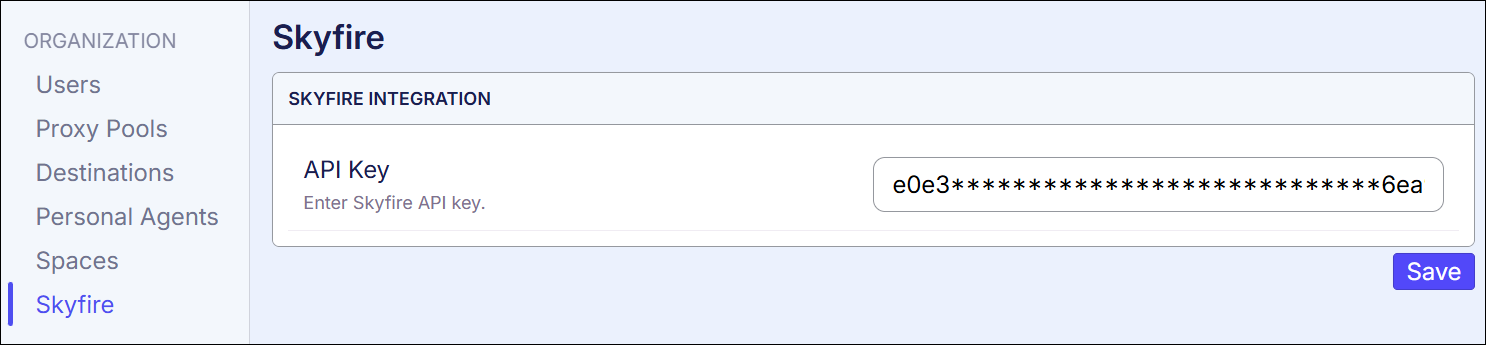
The API key will be used for all the organization’s agents, so this setup only has to be done once.
Configuring Skyfire Token Generation in Agents
Skyfire uses signed tokens to carry identity and payment information between agents and services. A Sequentum Cloud agent must be configured to generate a Skyfire token, and the agent then sends this token with all web requests to the target website.
To configure an agent to use Skyfire, open the agent in the Sequentum Cloud Editor, and then select the Agent command and the Skyfire options tab.
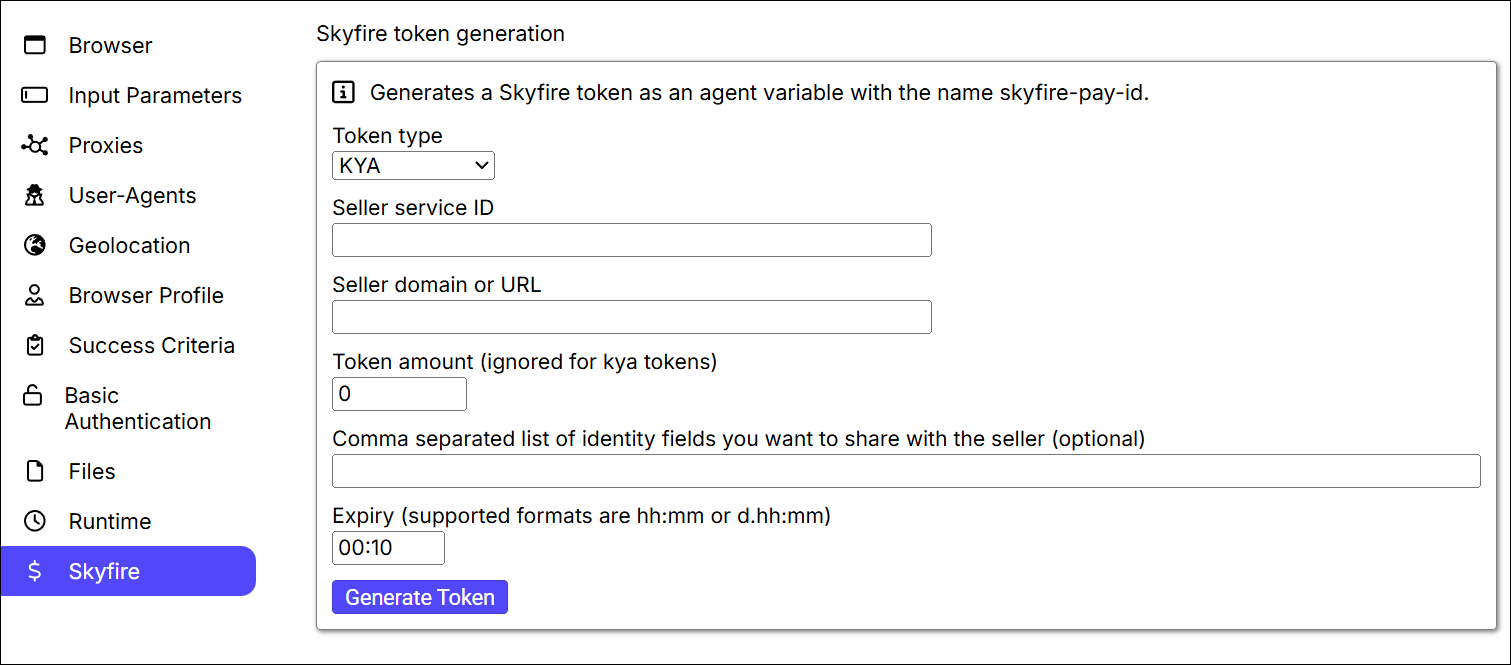
The Skyfire tab has the following available options.
-
Token type. The token type specifies whether the token can provide identity (KYA), payments (Pay) or both identity and payments (KYA And Pay). Please see the Skyfire website for more information about Skyfire token types.
-
Seller service ID. This is the ID of the Skyfire seller service the token is authorized to interact with. The seller service IDs can be found on the Skyfire website. The seller service ID is not required if a seller domain or URL is provided.
-
Seller domain or URL. This is the domain or URL of the Skyfire seller service the token is authorized to interact with. The seller domain or URL is not required if a seller service ID is provided.
-
Token amount. This is the maximum US dollar amount the token is authorized to spend. This value is ignored if the token is providing identity only.
-
Identity fields. This is a comma separated list of identity fields the token provides to the seller service if the token is providing identity. Please see the Skyfire website for more information about Skyfire identity fields.
-
Expiry. This is the maximum time the token will stay valid. After expiry the token can no longer be used.
When Skyfire token generation has been configured for an agent, the token is automatically generated when an agent is run or previewed in the editor. During design time in the editor, the token must be manually generated by pressing the Generate Token button.
When a Skyfire token is generated by the Sequentum Cloud agent, the token is stored as a variable named skyfire-pay-id in Global Data. The token can be retrieved from Global Data in scripting, or by using interpolation anywhere interpolation is supported in an agent.
Adding a Skyfire Token in a Custom Header
Skyfire sellers decide how their services will receive Skyfire tokens, but most services will expect the Skyfire token to be set in a custom web request header. A Sequentum Cloud agent can easily be configured to send custom headers. Open the agent in the Sequentum Cloud Editor and select the first action command, which is normally the URL command that loads the first page. Open the Browser options tab and enter the custom header. Most Skyfire services will expect a custom header named skyfire-pay-id, and interpolation can be used to retrieve the Skyfire token from Global Data, so the custom header becomes:
skyfire-pay-id: ${skyfire-pay-id}
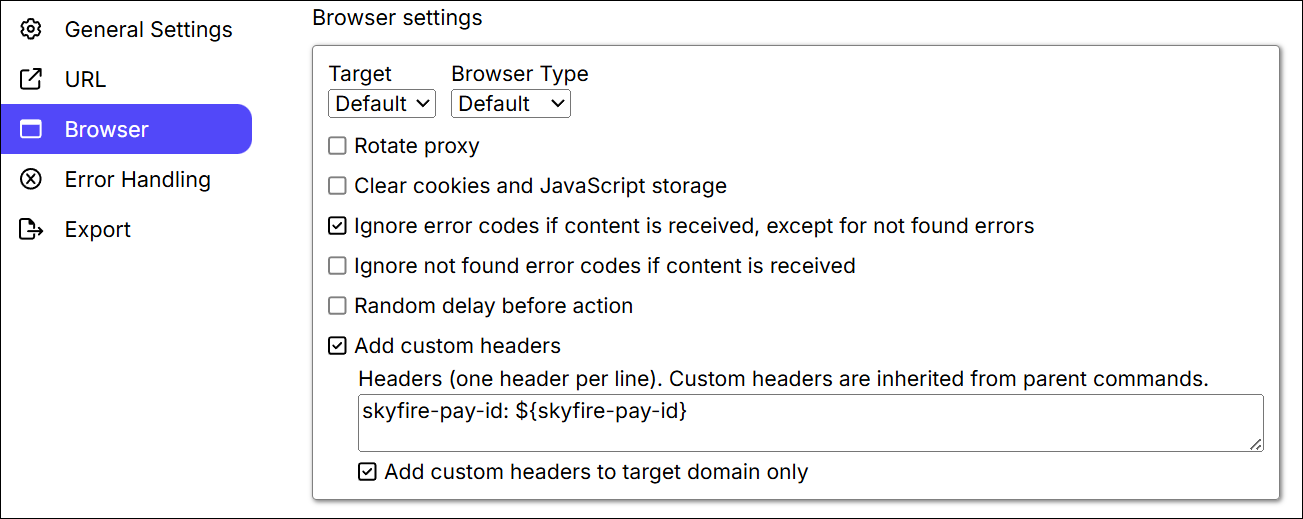
Custom headers are inherited from parent commands, so the custom header only has to be set on the topmost URL command that loads the first web page.